Workforce Anomaly Detection Software
Intelligent Insights at Your Fingertips
 Complete Data Visibility:
- Track, collect, and analyze real-time data for deeper operational insights.
 Accurate Anomaly Identification:
- Detect irregularities in work patterns with precision — including productivity drops, unexpected idle spikes, and after-hours activity — ensuring no critical deviations go unnoticed. Pair alerts with Predictive Burnout Analytics to act on fatigue and overload before they affect retention.
 Streamlined Reporting:
- Gain access to detailed reports and visual insights that highlight trends, outliers, and potential risks effortlessly.
 Scalability & Flexibility:
- Whether managing a small team or a large multi-site enterprise operation, TraqNext workforce anomaly detection scales efficiently — adapting to your business needs and flagging deviations across every department and location.
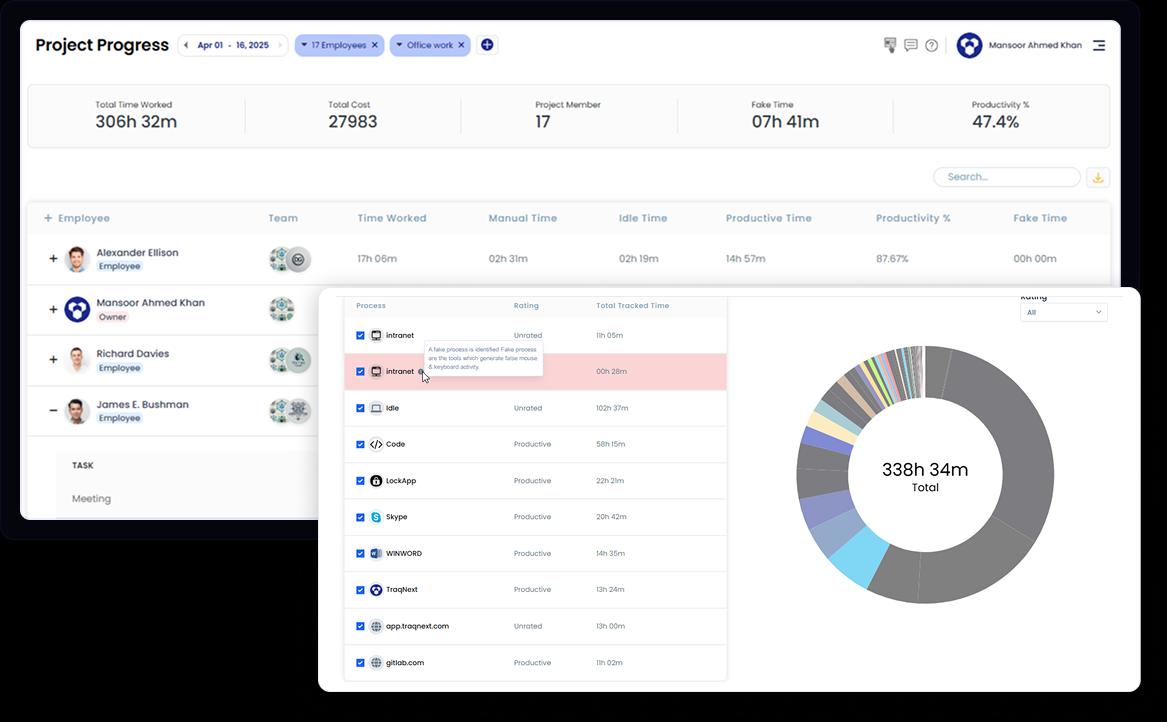
What Anomaly Detection Flagged for a 50-Person Distributed Team
- 1.
- Two designers were consistently logging work activity past midnight. The pattern had been running for eleven days. Neither had reported overwork — the hours simply were not visible to a manager in a different time zone. Task redistribution reduced the pattern within a week.
- 2.
- A developer was spending significantly less time in their coding environment and more time in unrelated apps. The shift had been gradual enough to stay invisible in a weekly productivity summary. A one-to-one addressed it before it affected sprint velocity.
- 3.
- TraqNext sends different alerts when a user opens a prohibited app, goes inactive, manually adds time, or shows unusual keyboard and mouse activity — so managers are immediately notified, without waiting for a report or a check-in to surface the issue.
- 4.
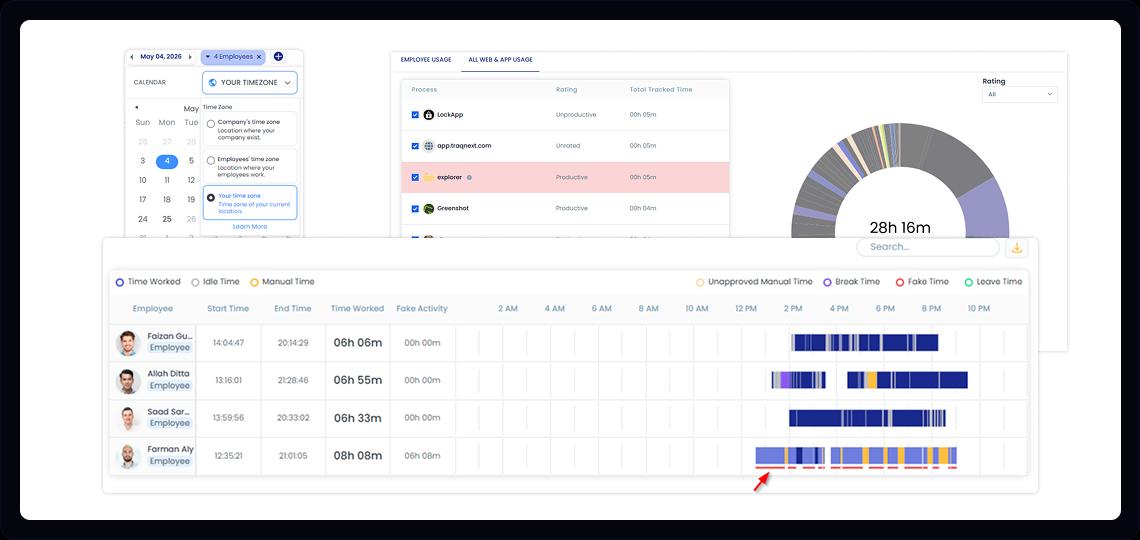
- A developer is reporting full time, and his productivity percentages are also good, but the output is weak. If he is using any application to generate fake mouse movements and keystroke events, those activities will be deducted, and the relevant timeline will be highlighted. Confronting the user about this behaviour may compel him to avoid such dodging tricks, if he is capable. Otherwise, the company can find a replacement, save resources, and stay aligned with project deadlines.
① Severity classification
TraqNext classifies each alert as Low, Medium, or High based on how far the activity deviates from that individual's rolling baseline — not against a fixed company-wide target. A High severity alert means the deviation is substantial and sustained, not just a slow afternoon.
② Baseline comparison
The alert shows today's active time alongside the person's rolling average for the past fourteen days. This gives the manager immediate context: how unusual is this, and for how long has the pattern been shifting? The percentage deviation is calculated automatically.
③ Action controls
From the alert itself, managers can open the full timeline for the flagged period, dismiss the alert if there's a known reason, or flag it for follow-up. No separate report needs to be pulled — the next step is built into the alert.
If you are evaluating anomaly detection across platforms, see how TraqNext compares to Insightful on detection depth, privacy controls, and reporting.
Frequently Asked Questions
See also: